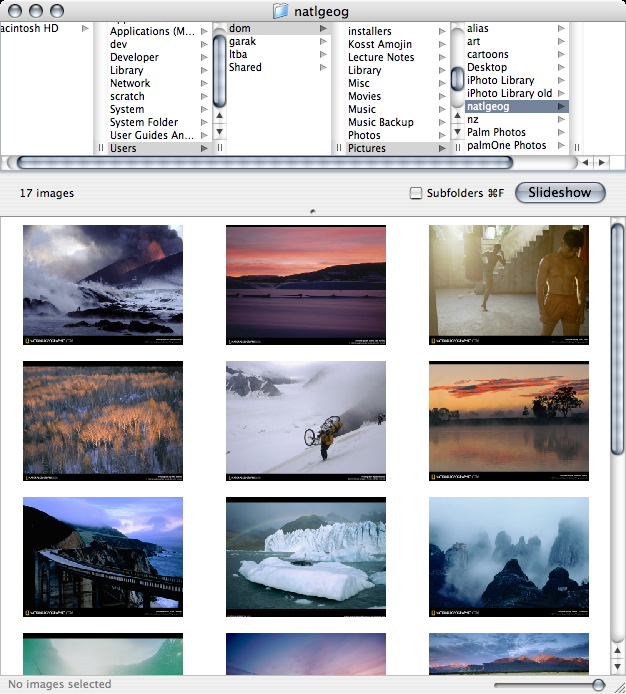
Phoenix Slides is a fast full-screen slideshow program/image browser, for flipping through folders or disks full of images. Phoenix Slides also does lossless JPEG transformations and can display EXIF data. It runs on macOS 11.5 or later.
Phoenix Slides is a fast full-screen slideshow
program/image browser, for flipping through folders or disks
full of images. Phoenix Slides also does lossless JPEG
transformations and can display EXIF data.
It runs on macOS 11.5 or later.
Version 1.6 released 2026 May 23
Download Phoenix Slides 1.6.1 (889 KB)
- or download on github
For macOS 10.13-11.4, download version 1.5.9 (885 KB)
For OS X 10.9-10.12, download version 1.4.7 (659 KB)
For OS X 10.3-10.8, download version 1.3.1 (870 KB)
View Documentation (Deutsch | 中文 | Español | Italiano)
Source code - now available on github!
Donations?: see below!
More version history.
And/or a recent-ish blog post here: Phoenix Slides Lives!
Phoenix Slides is free! If you feel you have benefited from this software and feel inclined to make a donation, here are some buttons:
 (less overhead, but US/UK only)
You are also welcome to contact me for whatever reason, of course.
"Phoenix Slides is blazingly fast. With my 1000+ photos, iPhoto smoulders along, but the phoenix burns right though them." --Eugene Liu
Phoenix shows the directory structure perfectly, and having them display full screen one by one or as manual or timed slide shows is just perfect. The ability to play a slide show including subdirectories is just brilliant. Well done, and thank you for a very professional piece of software. --ChrisG_UK, versiontracker
Exactly what I was looking for! A way to browse my photos without importing to iPhoto. I can also scroll through folders in full screen using the mouse buttons. Well done! --steve, versiontracker

Copyright 2005-2026 by Dominic Yu. This software is free and open source. You are free to use it for non-commercial purposes. Derivative works must give proper credit to me and be shared under the same license, unless I give written permission stating otherwise.